How to use this site
A guide for staff — raising a swap request, and running the
treatment roster.
You are not signed in. You can read this page and look at the
rosters, but you cannot submit a request, see the request lists or
edit anything until you sign in.
Sign in now.
4 Planning & treatment rosters
Two grids, two different answers to “may I change this?” Signed in as staff:
| Page | As staff you can | Set by |
|---|---|---|
| Planning roster | Read it. The shifts, the relieving and the day's remark are not yours to change — the page opens read-only and there is no Lock button on it for you. | Senior / admin |
| Treatment machine roster | Run it — operating hours, staff bands, off / AL / SL, the day's remark, batch assign, and the reset. This is the sheet the machine i/c keeps. | You |
| Duty board, leave & duty list, holiday board | Read them. They are the department's record. | Admin |
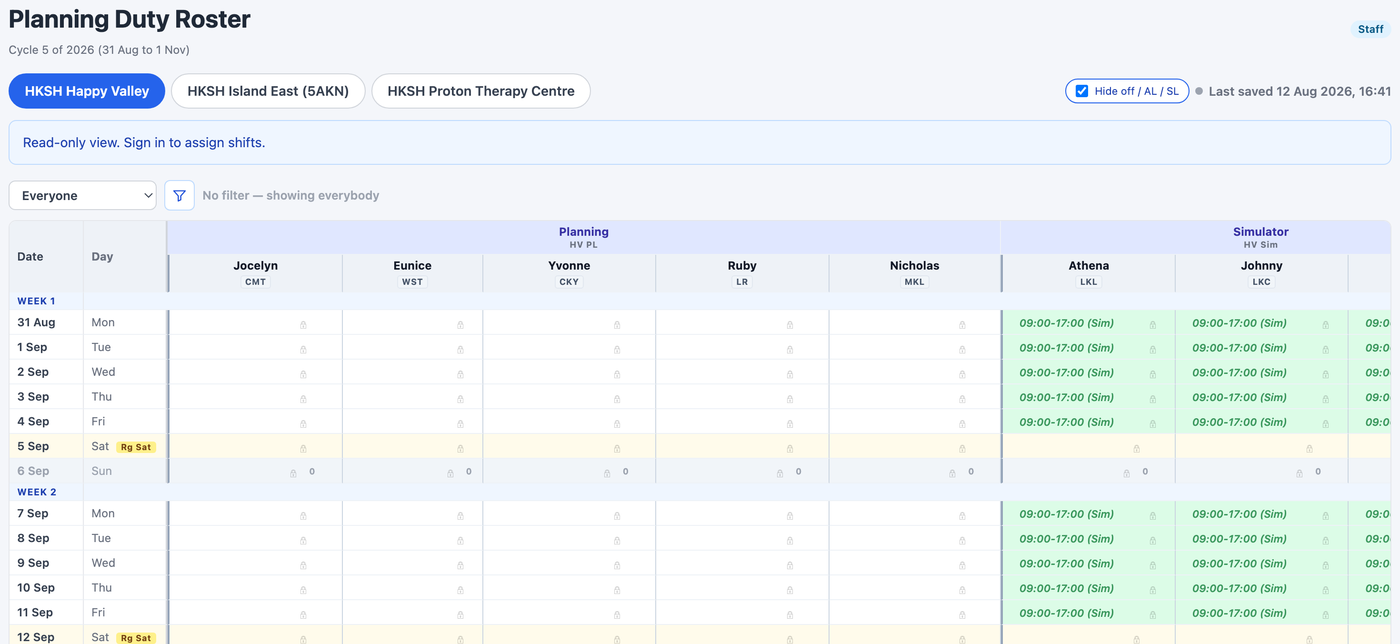
The blue bar on the planning roster says “Read-only view. Sign in to assign shifts” even when you are already signed in as staff. Nothing is wrong: it is the page's way of saying the shifts are not yours to set. Read it, work to it, and raise a request if a day on it needs to change.
Both rosters show one centre at a time — the tabs across the top are the centres, and on the treatment roster a second row of tabs picks the machine. Check you are on the right pair before you start typing.